Cybercriminals Are Now Impersonating IT Support Through Microsoft Teams
Most employees have learned to be cautious about suspicious emails. But what happens when the attacker doesn’t send an email at all?
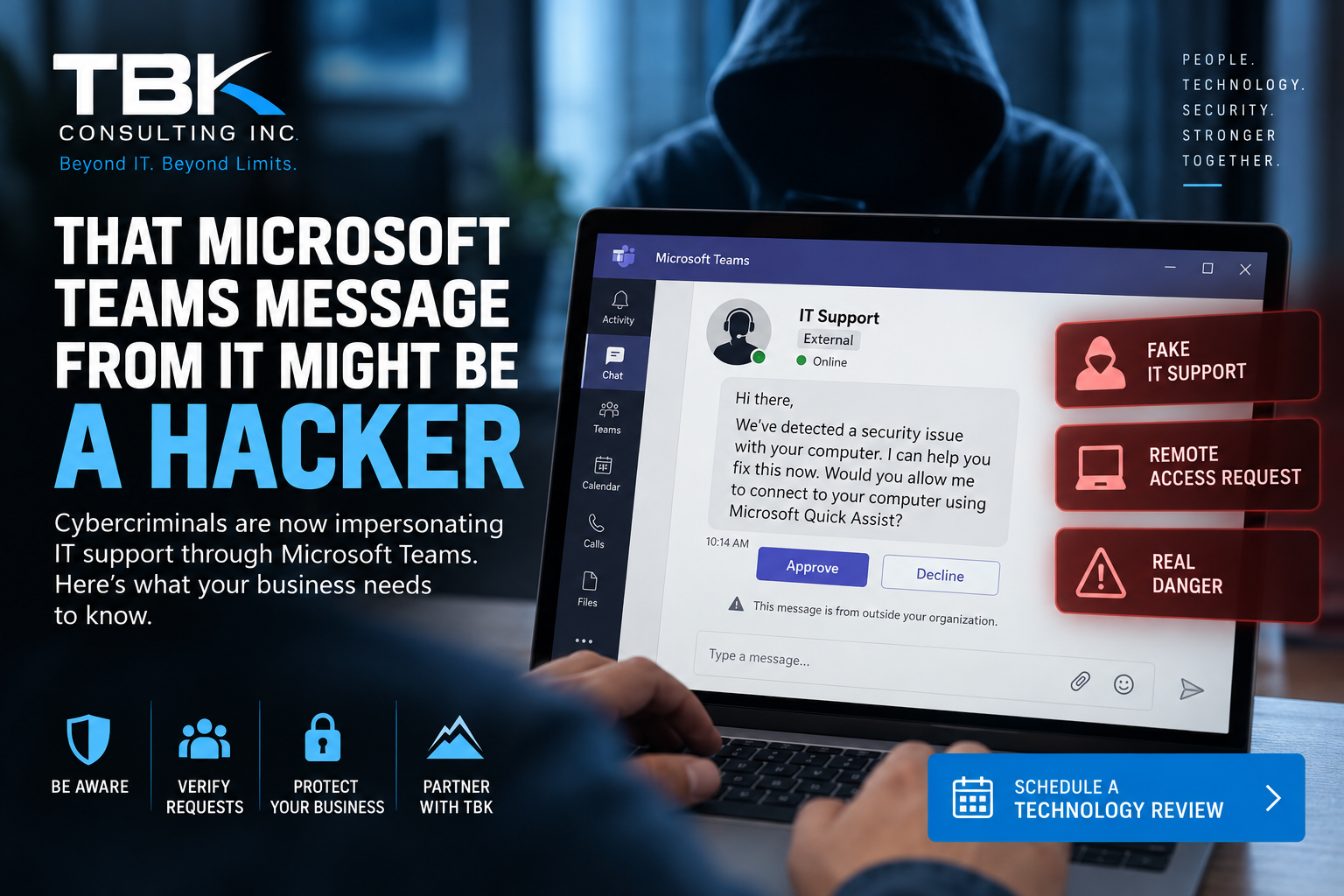
Microsoft Threat Intelligence recently identified a sophisticated cyberattack in which threat actors use Microsoft Teams to impersonate IT and help-desk personnel. Instead of trying to convince someone to click a traditional phishing link, the attackers contact employees through Teams and attempt to persuade them to grant remote access to their computers.
For businesses that rely heavily on Microsoft 365 and Teams, this attack is an important reminder that phishing is no longer limited to your inbox.
How the Microsoft Teams IT Support Scam Works
According to Microsoft, attackers initiate a Teams chat or call from an external Microsoft 365 tenant while pretending to be IT support, a help-desk technician, or another trusted technology professional.
The attacker may claim there is an urgent problem involving something such as:
- A Microsoft security update
- A spam-filter update
- Account verification
- A security problem with the employee’s computer
- An account that is about to be disabled
- A software update that supposedly needs immediate attention
The objective is to make the employee believe they are communicating with legitimate technical support.
Microsoft Teams does provide warnings when someone outside your organization initiates contact, but attackers rely on social engineering to convince users to ignore those warnings.
The Dangerous Part: “Let Me Connect to Your Computer”
Once the attacker establishes trust, the conversation can move to remote access.
The attacker may ask the employee to share their screen, approve a Request Control prompt in Teams, or launch a legitimate remote-support application such as Microsoft Quick Assist.
This is where the attack can become extremely dangerous.
Microsoft specifically advises users not to allow someone claiming to be IT Support to remotely connect unless the user initiated the support interaction.
Once an attacker has interactive access to the computer, what appeared to be a routine support call can quickly turn into a much larger cybersecurity incident.
What Happens After the Attacker Gets Access?
Microsoft’s investigation shows that the attack doesn’t necessarily stop with the employee’s computer.
In the campaign Microsoft analyzed, attackers used PowerShell to download and silently install a malicious MSI package. The malware then established persistent command-and-control capabilities on the compromised system.
From there, the attackers performed activities including:
- Gathering information about the computer
- Identifying installed security products
- Enumerating Active Directory accounts and servers
- Capturing screenshots of the victim’s desktop
- Installing additional malicious components
- Establishing persistent access
- Discovering other computers on the network
- Moving laterally between systems using Windows Remote Management (WinRM)
- Targeting critical infrastructure such as domain controllers and certificate authorities
In other words, one employee approving what appears to be a legitimate remote-support request could potentially give an attacker a foothold into the organization’s network.
The behavior Microsoft observed is consistent with activity that can precede data theft, extortion, ransomware, and other serious compromises.
Why This Attack Is Particularly Concerning
Traditional phishing protection concentrates heavily on email.
Businesses deploy spam filtering, URL protection, attachment scanning, email authentication, and security-awareness training to stop malicious email.
Those protections remain essential, but attackers are adapting.
Microsoft Teams, collaboration platforms, phone calls, text messages, and legitimate remote-support applications can all become part of a social-engineering attack.
There may not be an obviously malicious attachment.
There may not even be a suspicious link.
Instead, the vulnerability the attacker is attempting to exploit is trust.
An employee sees someone claiming to be “IT Support,” hears that something needs immediate attention, and grants access because the request appears legitimate.
A Simple Rule Can Stop Many of These Attacks
TBK Consulting recommends that businesses establish a straightforward rule for employees:
Never grant remote access to someone claiming to be IT support unless you initiated the support request or have independently verified the technician’s identity.
For TBK Consulting managed-services clients, employees should be especially cautious if someone unexpectedly claims to represent TBK and asks for remote access.
If you did not initiate a support request with TBK, verify the request with TBK Consulting before granting access to your computer.
A legitimate technician will understand why you want to verify their identity.
A cybercriminal would rather you didn’t.
Watch for External Microsoft Teams Contacts
Microsoft Teams identifies conversations involving people outside your organization.
Employees should pay attention to these warnings.
If an unfamiliar person contacts you through Teams claiming to represent Microsoft, TBK Consulting, your internal IT department, or another technology provider:
- Check the sender’s identity.
- Look carefully at the organization or email address associated with the account.
- Do not accept unexpected remote-control requests.
- Do not provide authentication codes or passwords.
- Do not run commands provided by the person.
- Do not install software at their request.
- Contact your known IT provider using a trusted phone number or support method.
Never use contact information supplied by the suspicious person to perform the verification.
Businesses Should Review Microsoft Teams External Access
Employee awareness is only one layer of protection.
Organizations should also review how Microsoft Teams allows communication with external organizations.
Depending on your business requirements, security policies can be configured to restrict external communications or limit them to trusted organizations.
Microsoft also recommends reviewing external collaboration policies and ensuring users receive clear warnings when communicating with people outside the organization.
Businesses should consider additional controls including:
- Multifactor authentication
- Microsoft Entra Conditional Access
- Managed-device requirements
- Endpoint Detection and Response (EDR)
- Microsoft Defender protections
- Attack Surface Reduction rules
- Restrictions on unauthorized remote-support software
- Monitoring of PowerShell and scripting activity
- Restrictions on administrative protocols such as WinRM
- Security-awareness and phishing training
The right configuration will depend on the organization’s environment and operational requirements.
Remote Support Tools Need Security Controls Too
Remote-support software is extremely useful. TBK Consulting and other IT providers rely on remote-management technology every day to efficiently assist clients.
That usefulness is exactly why attackers want to abuse it.
Businesses should know which remote-support applications are authorized within their environment and consider blocking or removing unnecessary alternatives.
Microsoft specifically notes that organizations using another remote-support solution may want to disable Quick Assist if it isn’t required.
Reducing the number of available remote-access methods reduces the opportunities attackers have to convince an employee to provide access.
What Should You Do If Someone Already Granted Access?
If an employee believes they may have granted remote access to an attacker, treat the situation as a potential security incident.
Contact your IT provider immediately.
Don’t wait to see whether something happens.
Depending on the circumstances, your IT or cybersecurity provider may need to:
- Isolate the affected computer from the network
- Terminate unauthorized remote sessions
- Review endpoint security telemetry
- Search for malicious software or persistence mechanisms
- Examine PowerShell and Windows event logs
- Investigate Microsoft 365 and Teams activity
- Review authentication activity
- Determine whether credentials were exposed
- Reset potentially compromised credentials
- Investigate lateral movement
- Examine other computers for related indicators of compromise
Microsoft recommends organizations that identify indicators associated with this campaign assume the attacker may have obtained network-level access through the compromised endpoint and prioritize credential rotation accordingly.
Early reporting can make an enormous difference.
Cybersecurity Is Moving Beyond Email
This attack illustrates an important change in today’s threat landscape.
Cybercriminals don’t necessarily need to break through a firewall or discover a sophisticated software vulnerability.
Sometimes they simply need to convince one employee:
“I’m from IT. Click Accept and I’ll fix the problem.”
Modern cybersecurity therefore requires more than antivirus and spam filtering. Organizations need overlapping protections covering people, identity, endpoints, email, cloud applications, remote access, and the network itself.
That is the principle behind a layered cybersecurity strategy.
Schedule a Technology Review With TBK Consulting Inc.
Technology changes quickly. So do cyber threats.
A TBK Consulting Technology Review can help identify areas where your organization’s technology, Microsoft 365 environment, cybersecurity protections, backups, network infrastructure, policies, and support processes may need attention.
We’ll review your current environment, discuss your business requirements, and help identify practical opportunities to improve security, reliability, and productivity.
Don’t wait for a security incident to discover where the gaps are.
Comments are closed